 Photo Offloader
Insert a card and walk away. Once the upload starts, your photos appear live on your phone, or on any device signed in to Google Photos.
Insert a camera card into your Mac and Photo Offloader does the rest. It copies everything to the Mac and checks each copy with SHA-256, mirrors the archive to a USB drive, and can upload JPGs and video to Google Photos. It never deletes anything from the card and never overwrites an existing file.
Camera card → Mac (verified) → USB drive (optional) → Google Photos (optional, no RAW)
Features
- Imports by itself. Insert a card and the import starts, with no clicks. Pause automatic imports when you insert a card you don’t want imported.
- Verified copies. Every file is checked with SHA-256 against the card before it gets its final name, and the copy to the USB drive is checked the same way.
- Nothing lost or overwritten. Nothing is ever written to or deleted from a card. A different file with the same name is kept next to the old one, never in its place.
- Only new files. A catalog remembers what you’ve imported, so a card you insert again only copies what’s new.
- A tidy archive. Files are sorted by month and camera, with RAW files in their own folder.
- USB backup. The archive is mirrored to a USB drive after each import, or by itself when the drive connects if you turn that on. The dashboard says how far behind the drive is.
- Google Photos. JPGs and videos can be uploaded to an album through rclone. RAW files stay on your disks.
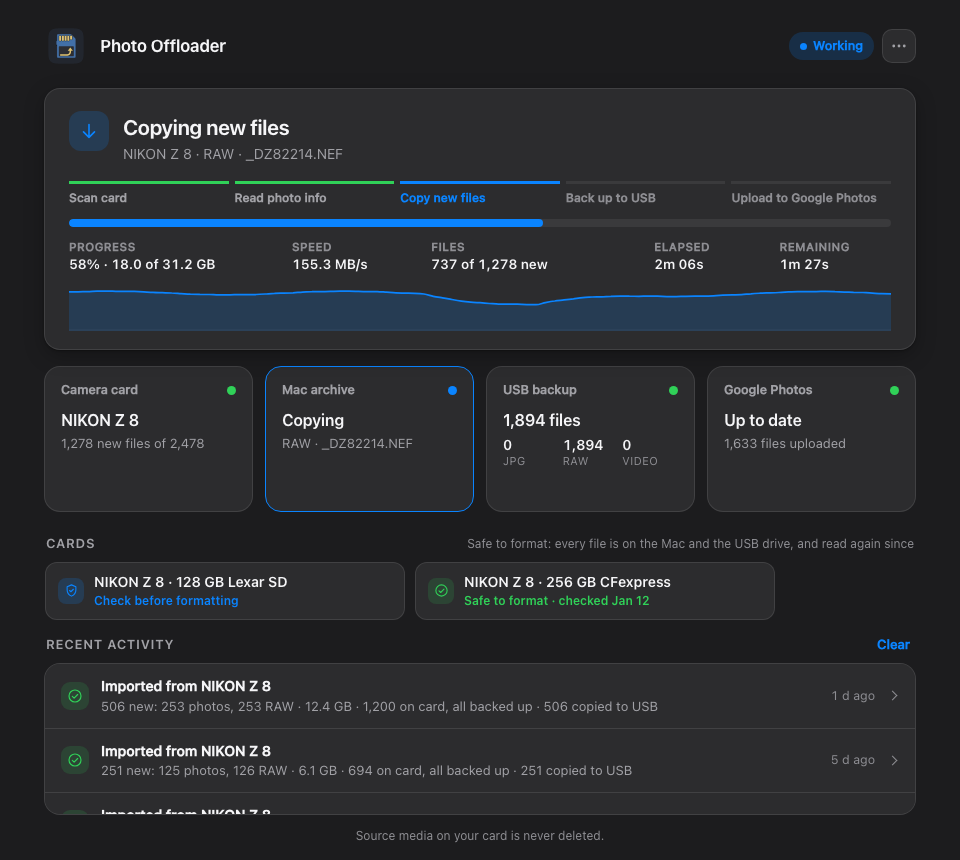
- A dashboard and a menu bar. Follow each import’s progress, speed and time left, see what happened in past runs, and start, pause or stop Photo Offloader.
- Clear failure reports. When something goes wrong, the dashboard says which files weren’t saved and why, and a card it couldn’t fully read is never called done.
- Check saved copies. Reread everything on the Mac and the USB drive and compare it with the hashes saved at import time, to catch damaged or missing files.
- Know when to format. Each card you’ve used says Safe to format once every file on it is verified on the Mac and the USB drive, even if the backup happens days later.
- Eject after import. The card can be ejected for you once its copy to the Mac is verified.
Requirements
- macOS (the only supported system for now) with Python 3.9 or newer
- Optional: a USB drive for the backup, named
Photosunless you choose another name - Optional: ExifTool (
brew install exiftool), so videos are filed under their camera - Optional: rclone and a Google Cloud sign-in for Google Photos: see the setup guide
Install, upgrade, uninstall
From a clone of this repository:
./install.sh                   # install, or upgrade after a git pull
./uninstall.sh --dry-run       # preview what uninstalling removes
./uninstall.sh                 # uninstall; your photos and catalog stay
The dashboard opens when the install finishes, and its icon, an SD card, appears in the menu bar. Insert a card
to start. To open it again later, double-click Photo Offloader on your Desktop or in
~/Applications.
macOS may ask whether Photo Offloader can find devices on your local network. It doesn’t need to: cards and the USB drive are local disks, Google Photos is reached over the internet, and the dashboard only talks to Photo Offloader on your own Mac. You can choose Don’t Allow, and change it later in System Settings › Privacy & Security › Local Network.
Treat this as backup infrastructure, not your only copy. After installing or upgrading, check the files in the archive before you format a card.
Where things are
The archive folders and the USB drive are defaults. To change them, choose Edit settings… in the dashboard’s ⋯ menu (details).
| What | Where |
|---|---|
| Photos, video and other files | ~/Pictures/CameraImports |
| RAW files | ~/Pictures/CameraImportsRaw |
| USB backup | /Volumes/Photos/CameraImports |
| Import log | ~/.camera_transfer.log (or ⋯ › View logs in the dashboard) |
| Start, stop, status | ~/Library/Application Support/PhotoOffloader/scripts/service.sh |
Status
Photo Offloader is a personal project that’s used for real, but by one person so far:
- Tested on: macOS 26 with a Nikon Z 8 (SD and CFexpress cards) and an HFS+ USB drive. CI runs about 1,200 tests on macOS with Python 3.9 to 3.14.
- Not tried yet: other camera brands (it reads
DCIM,PRIVATEandMP_ROOT), exFAT backup drives, a clean install on another Mac, and a card that really fails mid-import (the failure reports have only run against simulated failures).
If you try it, an issue saying what worked, or what didn’t, with your camera and macOS version, is very welcome. Keep your own backup until you trust it.
Documentation
These pages are also on the project website.
- Using Photo Offloader: the dashboard and menu bar, what each step means, pausing and stopping
- Google Photos setup: a step-by-step guide, with a command that checks your setup
- Google Drive stopped uploading to Google Photos: your options on a Mac since August 10, 2026
- How it works: the safety model, archive layout, catalog and logs
- Configuration: settings and environment variables
- Development: repository layout, tests and project rules
- Contributing: reporting a bug and proposing a change
- Changelog
How it was built
Photo Offloader was written with Claude Code, Anthropic’s AI coding tool, working to the rules in CODE_QUALITY.md and CLAUDE.md: a failing test first for each change and safety rules that every change must keep. A person reviews every pull request before it’s merged, then tries the change on real cards.